
ServiceNow CAM Authorization Boundaries: How AI Can Streamline RMF Workflows
See how RangeSherpa helps users navigate ServiceNow CAM workflows, configure authorization boundaries, create dynamic filters, and explore authorization packages.
Overview
Managing authorization boundaries is an important part of security authorization and Risk Management Framework (RMF) activities. In large environments, however, the systems and components included in an authorization boundary can change over time.
Keeping those boundaries accurate can require security and compliance teams to work through complex enterprise applications, review system information, configure filters, and investigate authorization packages.
The Fusion Cyber RangeSherpa demonstration shows how an AI-assisted workflow can help users navigate these activities inside ServiceNow Compliance and Authorization Management (CAM).
Rather than replacing the underlying ServiceNow platform or the people responsible for compliance decisions, RangeSherpa acts as an interactive guide that helps users work through complex tasks.
What is ServiceNow CAM?
ServiceNow Compliance and Authorization Management (CAM) supports organizations in managing compliance, authorization, risk, and related security processes within the ServiceNow environment.
For organizations following the Risk Management Framework, these workflows can involve information about systems, controls, authorization boundaries, security assessments, findings, and authorization packages.
The challenge is that this information can span many records and workflows.
An AI assistant can provide an additional layer of guidance by helping users navigate the application and understand the steps involved in completing a task.
What is an authorization boundary?
An authorization boundary defines the scope of an information system that is being considered as part of a security authorization.
In practical terms, it helps establish which systems, components, services, and other elements fall within the scope being assessed.
This makes accurate boundary management important.
If the environment changes, the set of components associated with a boundary may also need to change. Manually maintaining those relationships can become difficult when an organization has a large or frequently changing environment.
This is where dynamic filtering can become useful.
Why are authorization boundaries difficult to maintain?
Authorization boundaries are not necessarily static.
Organizations may add, remove, or modify systems and components. If the boundary is maintained as a manually curated list, security and compliance teams may need to repeatedly review the environment to determine whether new items should be included.
This can introduce several challenges:
- Keeping boundary information current
- Identifying newly relevant system components
- Removing components that no longer meet the boundary criteria
- Maintaining consistent authorization scope
- Reducing repetitive administrative work
A rules-based or dynamically filtered approach can reduce some of this manual maintenance.
How do dynamic authorization boundary filters work?
A dynamic filter defines conditions that determine which records or components belong within a particular boundary.
Instead of manually adding every item to a list, the organization can define criteria that determine which items should be included.
For example, a filter might use information stored in a ServiceNow table to determine which records match the requirements of a particular boundary.
When the underlying information changes, the resulting set of matching items can change as well.
This can help teams maintain a more current authorization boundary without repeatedly rebuilding the list manually.
What does the RangeSherpa demonstration show?
The Fusion Cyber demo walks through an authorization-boundary workflow in ServiceNow CAM.
The workflow begins with the CAM environment, where users can review existing authorization boundaries and related authorization packages.
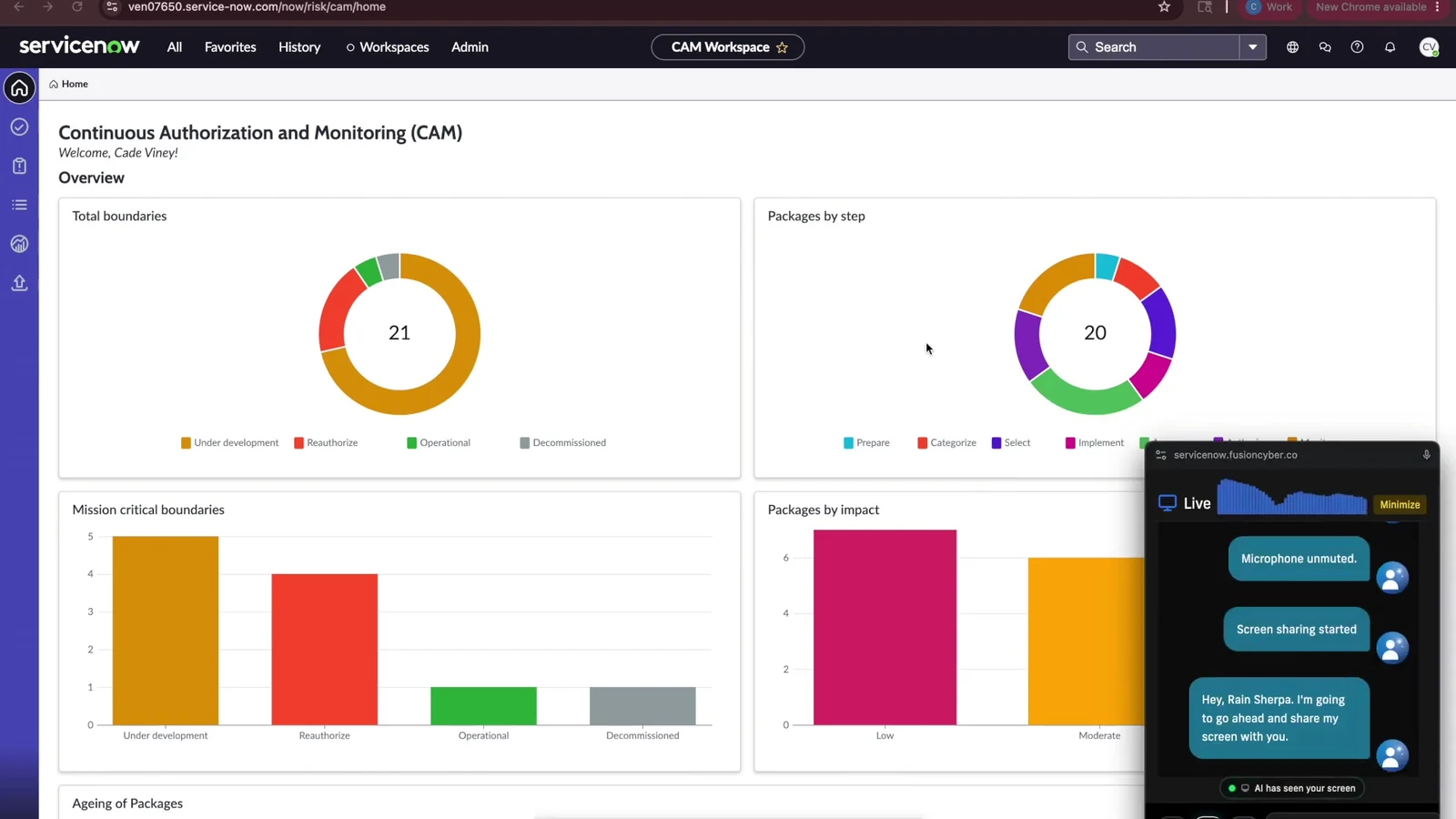
The ServiceNow CAM dashboard provides an overview of authorization boundaries and authorization packages.
From there, the user can select an authorization boundary and work through the available configuration options with assistance from RangeSherpa.
This is useful because the user does not have to rely entirely on static instructions to determine where to go next.
Creating a dynamic boundary filter
One of the key workflows demonstrated is the creation of a dynamic filter for an authorization boundary.

The boundary filter configuration allows conditions to be defined for dynamically selecting relevant records.
The process involves selecting the appropriate source information and defining conditions that determine which records should be associated with the boundary.
The important concept is that the filter represents a rule rather than a manually maintained list.
For a large environment, this can make boundary maintenance more manageable because the organization can define the criteria once and allow the resulting set of records to reflect changes in the underlying data.
How can dynamic filters reduce manual compliance work?
Consider an environment where hundreds or thousands of components may potentially belong to an authorization boundary.
A manually maintained list could require security personnel to repeatedly check whether new components should be added or existing components should be removed.
With a dynamic filter, the organization can define the conditions that determine membership.
The workflow becomes:
- Define the authorization boundary.
- Identify the source information used to determine membership.
- Define the required conditions.
- Allow matching records to be associated with the boundary.
- Review the resulting boundary as the environment changes.
This does not eliminate the need for security oversight. Instead, it can reduce repetitive administrative work and provide a more consistent way to manage boundary membership.
Exploring authorization packages
The demonstration also explores authorization packages associated with the environment.
An authorization package brings together information relevant to a system's authorization and security assessment activities.
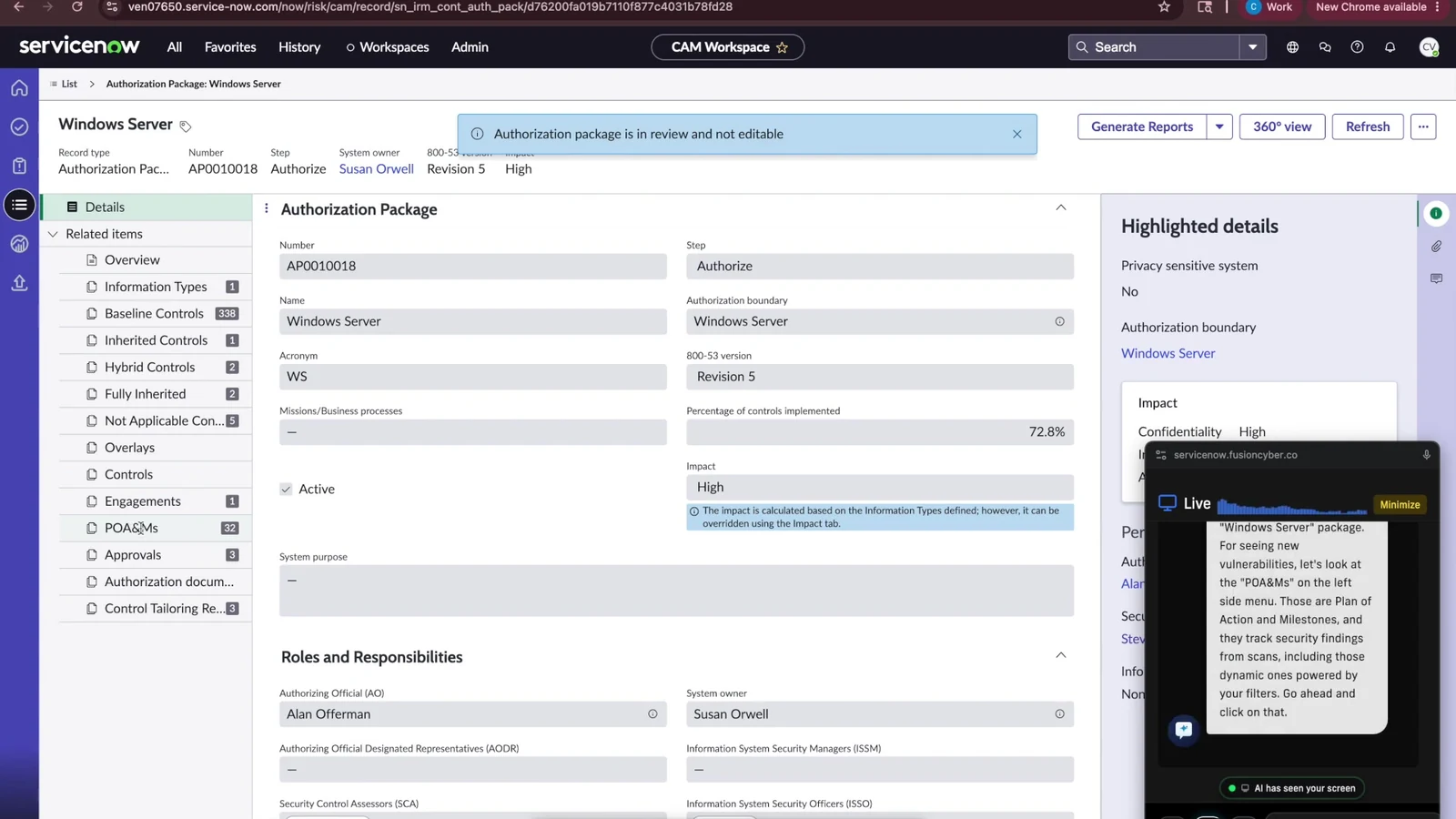
An authorization package provides information related to the authorization workflow, including roles and responsibilities.
For security and compliance teams, these packages can provide an important view into the information associated with an authorization effort.
The ability to navigate this information with contextual AI assistance can make complex workflows easier to understand, particularly for users who may not work inside ServiceNow CAM every day.
How can AI assist with RMF workflows?
AI assistance can be particularly useful when users need to navigate applications that contain many related records, fields, workflows, and configuration options.
In an RMF-oriented workflow, an AI assistant can help users:
- Identify where a particular workflow is located
- Navigate through application screens
- Understand configuration options
- Work through multi-step tasks
- Clarify terminology and workflow requirements
- Reduce time spent searching through documentation
The value is not simply that the AI can answer questions.
The more useful capability is providing guidance while the user is performing the task.
AI assistance does not replace compliance expertise
AI can help users navigate compliance workflows, but it should not be treated as a replacement for security professionals or organizational decision-makers.
Authorization and RMF activities can involve decisions about security controls, risk, system scope, evidence, and organizational policies.
Those decisions require appropriate human oversight.
A practical AI-assisted approach is therefore:
AI guidance + automation + human review
rather than:
AI replaces the compliance team.
This distinction is particularly important when AI is used in security and compliance environments.
Who can benefit from AI-assisted ServiceNow CAM workflows?
AI-assisted CAM workflows can be useful for organizations that manage complex authorization and compliance processes.
Potential users include:
- RMF practitioners
- Security and compliance teams
- ServiceNow administrators
- Security operations teams
- Compliance program managers
- Enterprise security leaders
Organizations with large or frequently changing environments may particularly benefit from reducing repetitive authorization-boundary maintenance.
How RangeSherpa fits into enterprise cybersecurity
The ServiceNow CAM demonstration is an example of a broader enterprise AI use case: helping security professionals work directly within the systems they already use.
Fusion Cyber's Enterprise platform brings AI capabilities across TRAIN, GROW, OPERATE, and DEFEND.
Within DEFEND, the platform addresses cybersecurity and compliance workflows including areas such as RMF, CMMC readiness, cloud security, and enterprise security operations.
RangeSherpa demonstrates how this approach can be applied to a specific operational problem: helping users navigate ServiceNow CAM and manage authorization-boundary workflows with AI assistance.
See the RangeSherpa ServiceNow CAM demo
The best way to understand the workflow is to see it in action.
Trusted references and external documentation
Explore Fusion Cyber's Enterprise Platform
Authorization boundary management is one example of how AI can support real-world cybersecurity and compliance operations.
Fusion Cyber's Enterprise platform is designed to bring AI into practical organizational workflows across training, growth, operations, and cyber defense.
If your organization is exploring AI-assisted cybersecurity, compliance, RMF workflows, or enterprise automation, learn more about Fusion Cyber's Enterprise platform.
Explore Fusion Cyber Enterprise →
Frequently Asked Questions
Common questions and detailed answers about this topic
This article answers:
- What is ServiceNow CAM?
- What is an authorization boundary?
- How do authorization boundaries work in ServiceNow CAM?
- What are dynamic authorization boundary filters?
- How can AI assist with ServiceNow CAM workflows?
- How does RangeSherpa support RMF workflows?
- How can organizations reduce manual authorization-boundary maintenance?
- What are authorization packages?